> For the complete documentation index, see [llms.txt](https://docs.relevant-digital.com/llms.txt). Markdown versions of documentation pages are available by appending `.md` to page URLs; this page is available as [Markdown](https://docs.relevant-digital.com/ad-revenue-insights/data-connections/creating-a-yield-to-yield-api-connection.md).
# Creating a Yield-to-Yield API Connection
Connect one Yield instance to another by setting up publisher-side access and configuring a Relevant Programmatic integration.
In case there is a need to connect from one Yield instance to another, it is easy to set it up by using a Relevant Programmatic integration type.
{% hint style="info" %}
In this article, Account A refers to the sender and Account B to the recipient of data.
{% endhint %}
### Account A: Setting Up the Publisher User for API
{% stepper %}
{% step %}
## Go to the user settings
Go to the user settings of the publisher account that requires the API connection. Create a user for the publisher using the email address they wish to use for setting up reporting on their side.
{% endstep %}
{% step %}
## Send the credentials
Send the credentials to the user, along with the URL for your API connection, which you can confirm with your support contact at Relevant.
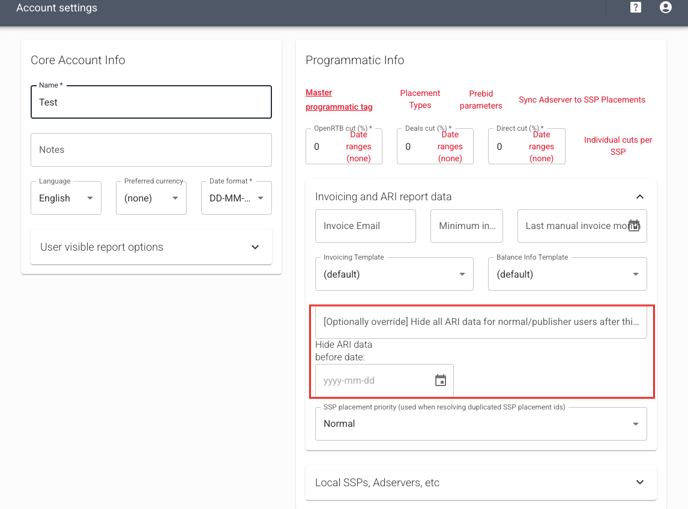
If there is a need to limit the access to API data before a certain date, or hide the data after a certain amount of time has passed, you can set it under the Publisher Account's Invoicing and ARI report data settings.
More information about publisher users can be found [here.](/general-platform/user-management/publisher-users.md)
{% endstep %}
{% endstepper %}
### **Account B: Setting Up the Yield API Integration**
{% stepper %}
{% step %}
## Add a new SSP
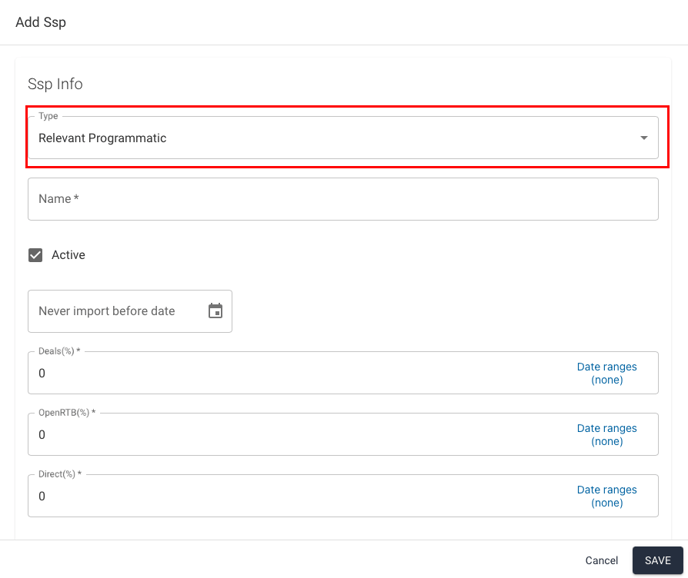
Go to Integrations and click the button to [add a new SSP](/ad-revenue-insights/data-connections/setting-up-a-new-ssp-connection-with-api.md). Select Relevant Programmatic as the integration type, and give the connection a descriptive name.
{% endstep %}
{% step %}
## Enter the Relevant Yield API URL
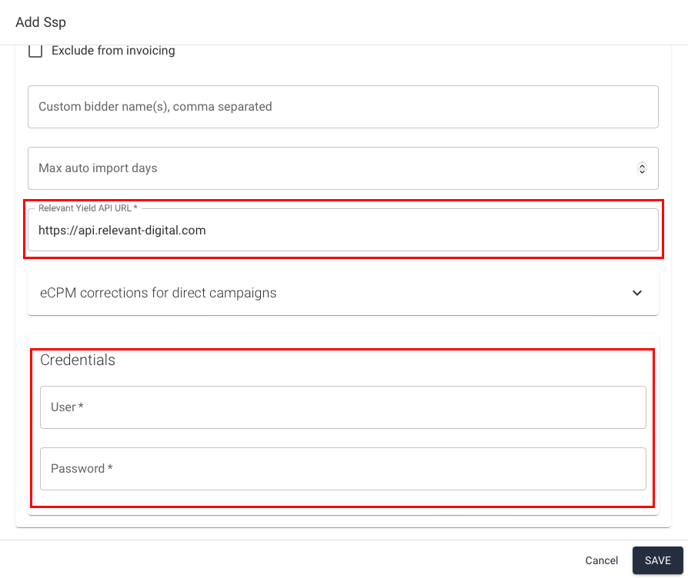
For the Relevant Yield API URL, enter the link for the API instance provided by your integration partner. For the credentials, use those associated with the API connection that were previously sent to you. Make sure to save the integration.
{% endstep %}
{% step %}
## Test the connection
Next, test the connection by manually importing data for a single day. If the import is successful, the data will appear under Missing SSP Traffic, and you will be able to map it to the correct websites as usual.
{% endstep %}
{% endstepper %}
---
# Agent Instructions
This documentation is published with GitBook. GitBook is the documentation platform designed so that both humans and AI agents can read, navigate, and reason over technical content effectively. Learn more at gitbook.com.
## Querying This Documentation
If you need additional information that is not directly available in this page, you can query the documentation dynamically by asking a question.
Perform an HTTP GET request on the current page URL with the `ask` query parameter, and the optional `goal` query parameter:
```
GET https://docs.relevant-digital.com/ad-revenue-insights/data-connections/creating-a-yield-to-yield-api-connection.md?ask=&goal=
```
`ask` is the immediate question: it should be specific, self-contained, and written in natural language.
`goal` is optional and describes the broader end goal you are ultimately trying to accomplish on behalf of the user. GitBook uses it to tailor the answer towards what is most useful for that goal.
The response will contain a direct answer to the question and relevant excerpts and sources from the documentation.
Use this mechanism when the answer is not explicitly present in the current page, you need clarification or additional context, or you want to retrieve related documentation sections.