> For the complete documentation index, see [llms.txt](https://docs.relevant-digital.com/llms.txt). Markdown versions of documentation pages are available by appending `.md` to page URLs; this page is available as [Markdown](https://docs.relevant-digital.com/ad-revenue-insights/data-connections/setting-up-a-new-ssp-connection-with-api.md).
# Setting Up a New SSP Connection with API
Connect a new SSP through API by creating API access, adding credentials, importing data, and mapping incoming placements in Relevant Yield.
Relevant Yield gathers data from API sources daily. Depending on your geographical location, there may be slight variations throughout the day, but our goal is to consistently provide fresh data for your work sessions.
{% hint style="info" %}
**This article is about API connections.** You should always use the API if possible. However, if for some reason the SSP doesn't provide an API connection, you may consider the CSV import option described in this article: [Set Up a New SSP Connection Through a Scheduled Daily CSV File.](/ad-revenue-insights/data-connections/setting-up-a-new-ssp-connection-through-a-scheduled-daily-csv-file.md)
{% endhint %}
{% stepper %}
{% step %}
## Create an API User in Your SSP
Your Relevant Digital Technical Account Manager will supply you with a dev\_\[customer name]@relevant-digital.com email address. You'll need this address to establish a new API user within the SSP.
{% hint style="info" %}
The API user may differ from a standard user, depending on the SSP.
{% endhint %}
The primary concern is ensuring that the user has access to the SSP's API features.
You may need to provide details regarding the **frequency of API calls**, which typically average around **five calls per day**. Fortunately, most SSPs/ad servers do not impose additional charges for API access, simplifying the process of obtaining it.
### Integrating Magnite API
We have established a Preferred Data partnership with Magnite, allowing us to add Magnite API support for all our API Insight customers. This partnership ensures better and more stable data collection for you.
{% hint style="info" %}
We remain 100% SSP and ad server independent. This partnership simply enables us to provide you with API access to Magnite.
{% endhint %}
If you are currently using CSV imports for Magnite, we can assist you in transitioning to API access as part of our partnership. This means you do not need to broker your own API agreement with Magnite; all arrangements can be managed through us.
#### How to Get Started
To initiate the integration of Magnite API access, please contact your Technical Account Manager or our support team. They will provide the necessary guidance and assistance throughout the setup process.
{% endstep %}
{% step %}
## Add a New SSP Connection in Relevant Yield
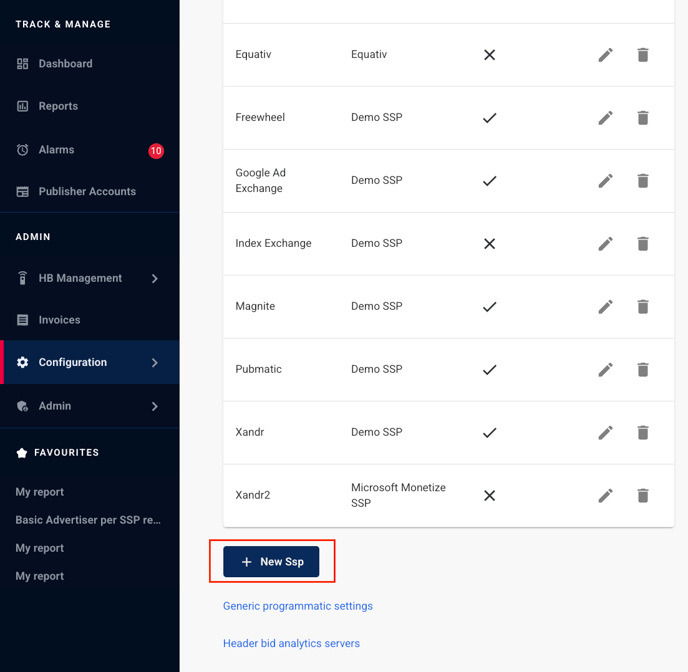
To add a new SSP connection, go to **Configuration > Integrations** and click " **+ New SSP**".
{% endstep %}
{% step %}
## Fill in the Required Fields
In the settings pop-up, you'll need to specify the type (which SSP) and a name for the connection. Additionally, you can define how you wish to manage the imported data (assign a percentage to specific buying/selling ad inventory for that SSP).
If you have any questions regarding the settings, please don't hesitate to reach out to our support team.
It's important to note that the settings may vary depending on the SSP.

{% hint style="info" %}
Understand how mapping works in your SSP before you populate data in Relevant Yield. The API works best when your placements have unique IDs, because this enables more granular reporting and better performance.
{% endhint %}
{% endstep %}
{% step %}
## Add SSP API Credentials
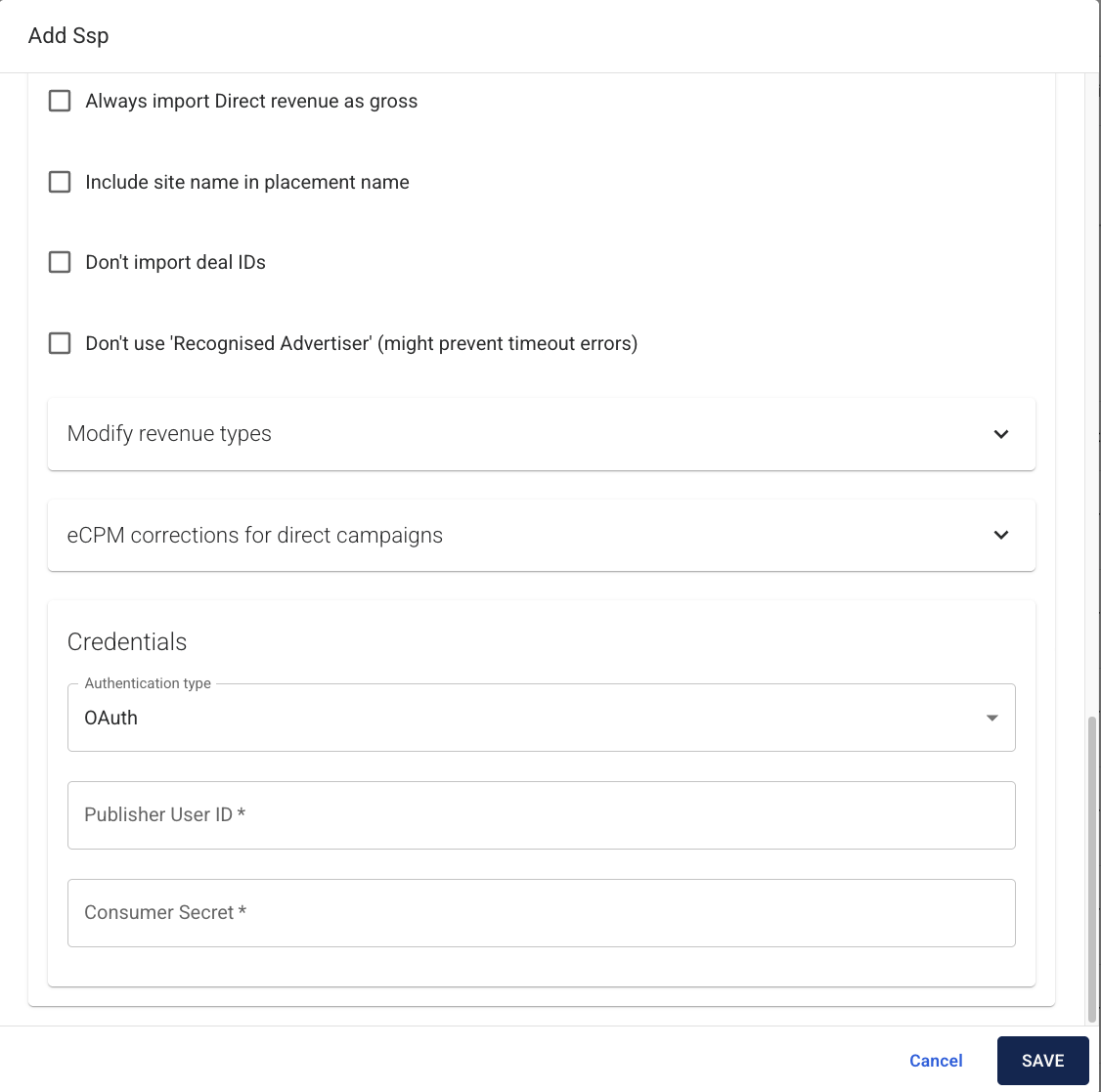
You will enter the credentials (the newly created API user from your SSP) at the bottom of the settings pop-up.
The required credentials vary depending on the SSP. In some cases, only the API user email and password from the SSP UI are needed, while in others, the credentials may include a consumer secret and consumer key. If you're uncertain, please reach out to your Technical Account Manager for additional guidance and support.
{% endstep %}
{% step %}
## Populate Data
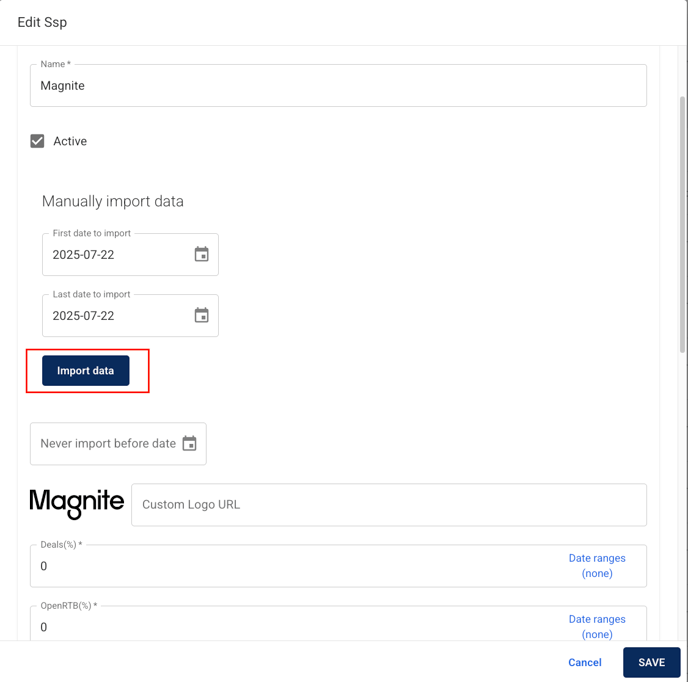
After adding your credentials, the system will populate with data, which becomes visible when generating a new API report. Data may populate automatically, typically by the following day. Alternatively, you can manually initiate an import, ensuring to import one day at a time to prevent overloading the system.
{% endstep %}
{% step %}
## Find the "Not Yet Mapped" API Structure
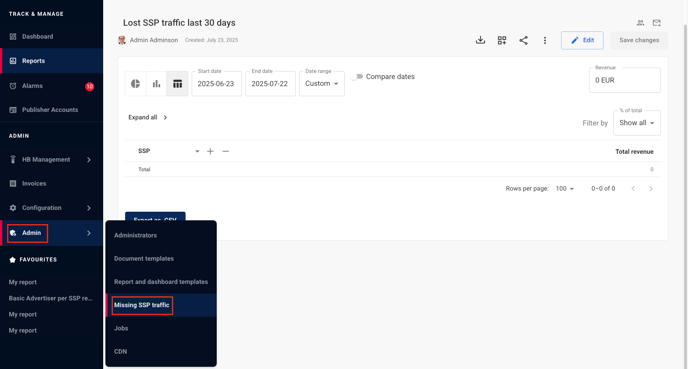
Once you can see data coming in, you can use the **Admin -> Missing SSP Traffic** section to view the names of the sites/placements that have been imported. From there, you can proceed to [map the new SSP IDs](/ad-revenue-insights/mapping/mapping-ad-server-and-ssp-placement-ids-to-relevant-yield-ad-revenue-insights-placements.md) to the corresponding websites.
{% endstep %}
{% endstepper %}
---
# Agent Instructions
This documentation is published with GitBook. GitBook is the documentation platform designed so that both humans and AI agents can read, navigate, and reason over technical content effectively. Learn more at gitbook.com.
## Querying This Documentation
If you need additional information that is not directly available in this page, you can query the documentation dynamically by asking a question.
Perform an HTTP GET request on the current page URL with the `ask` query parameter, and the optional `goal` query parameter:
```
GET https://docs.relevant-digital.com/ad-revenue-insights/data-connections/setting-up-a-new-ssp-connection-with-api.md?ask=&goal=
```
`ask` is the immediate question: it should be specific, self-contained, and written in natural language.
`goal` is optional and describes the broader end goal you are ultimately trying to accomplish on behalf of the user. GitBook uses it to tailor the answer towards what is most useful for that goal.
The response will contain a direct answer to the question and relevant excerpts and sources from the documentation.
Use this mechanism when the answer is not explicitly present in the current page, you need clarification or additional context, or you want to retrieve related documentation sections.