> For the complete documentation index, see [llms.txt](https://docs.relevant-digital.com/llms.txt). Markdown versions of documentation pages are available by appending `.md` to page URLs; this page is available as [Markdown](https://docs.relevant-digital.com/ad-revenue-insights/forecasting/forecast-reporting-and-dashboards.md).
# Forecast Reporting and Dashboards
Activate forecast imports, build forecast reports and dashboards, and understand how forecast data is collected and limited in Relevant Yield.
In this section, we describe forecast reports, including their functionality, underlying data sources, and important do’s and don’ts.
### What is the forecast report?
The forecast report can be used to get an overview of the sell-out rate on your websites. It is intended to give the user a broad perspective on how much inventory remains and whether target sell-out rates are being achieved.
The forecast report can be added as a regular report, as a dashboard, or even used as an alarm.
{% hint style="info" %}
The forecast report is not activated by default. You can ask our support team for help or enable it yourself by following the steps below.
{% endhint %}
### Activating the forecast report
You activate the forecast report by enabling the import of ad server forecasting data and then saving.
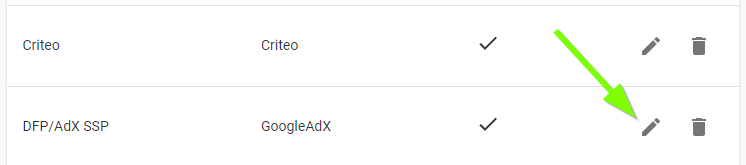
This function can be found at: Configuration -> Integration. Press **Edit** on the "GoogleAdX" type SSP in the column of your existing SSPs:
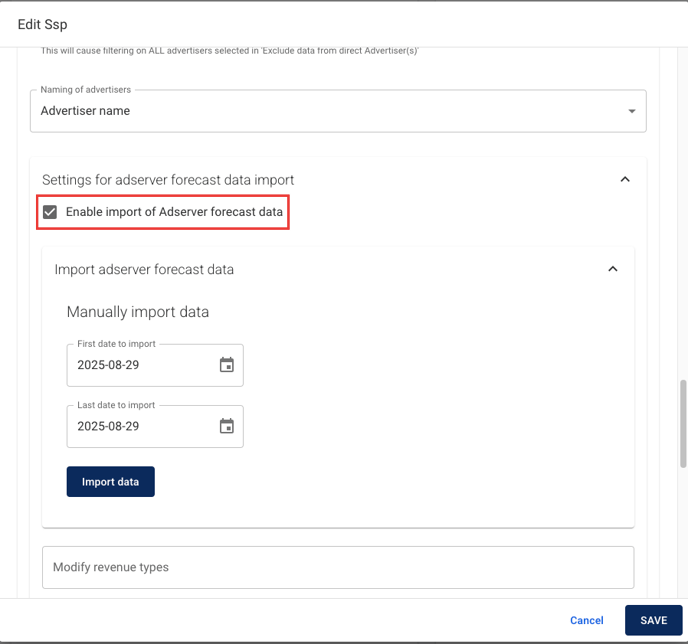
Then locate the **Settings for ad server forecast data import** section. Check the box to enable the import and save the data.
{% hint style="info" %}
The first import of forecast data runs with the normal data population on the following day. If you need the data earlier, open **Edit** again on your **GoogleAdX** SSP and click **Import data** manually for up to 90 days.
{% endhint %}

### Setting up the forecast report
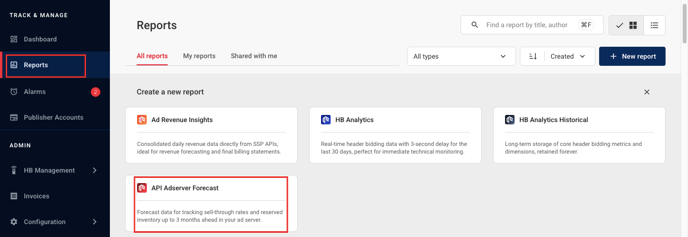
If you would like to set up a forecast report, simply select the **API Adserver Forecast type report** (or dashboard):
### How we collect and use the data
The forecast report and dashboard are based on ad server data collected from the ad server APIs. We collect this data once a day during our normal import cycle, so it is important to understand that the data visible in Relevant Yield might differ slightly from the current data in your ad server during the day.
One thing to consider is that the forecast report reflects reserved impressions, so OpenRTB and non-guaranteed deals are not included. This means that the forecast report should be considered as the "minimum currently sold", as OpenRTB and non-guaranteed deals are likely to be added on top of this data.
### What can be reported on
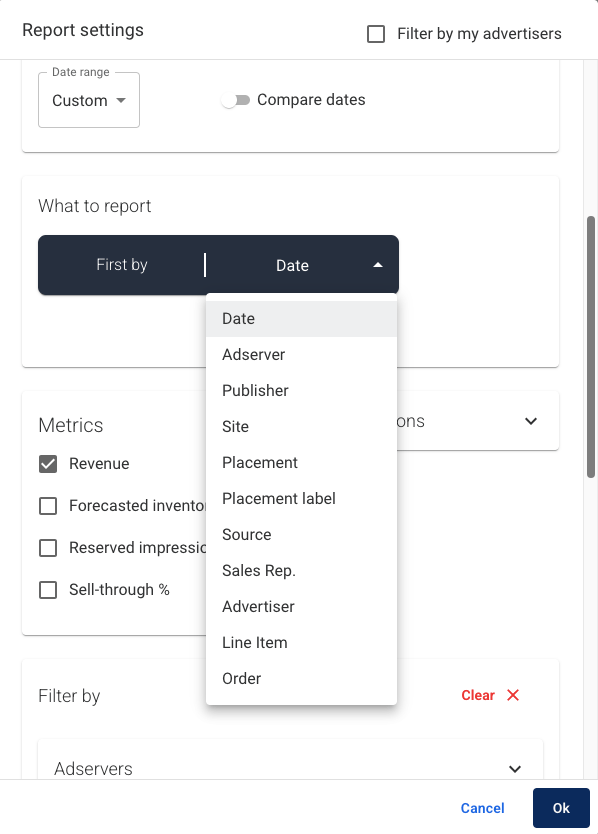
Below is a screenshot of all available dimensions and metrics in the forecast reports. More about the different API forecast report dimensions and metrics can be found [here](/ad-revenue-insights/forecasting/forecast-dimensions-and-metrics.md).
### Limitations
{% hint style="warning" %}
The forecast report currently works only for accounts that do not use custom targeting keys.
{% endhint %}
---
# Agent Instructions
This documentation is published with GitBook. GitBook is the documentation platform designed so that both humans and AI agents can read, navigate, and reason over technical content effectively. Learn more at gitbook.com.
## Querying This Documentation
If you need additional information that is not directly available in this page, you can query the documentation dynamically by asking a question.
Perform an HTTP GET request on the current page URL with the `ask` query parameter, and the optional `goal` query parameter:
```
GET https://docs.relevant-digital.com/ad-revenue-insights/forecasting/forecast-reporting-and-dashboards.md?ask=&goal=
```
`ask` is the immediate question: it should be specific, self-contained, and written in natural language.
`goal` is optional and describes the broader end goal you are ultimately trying to accomplish on behalf of the user. GitBook uses it to tailor the answer towards what is most useful for that goal.
The response will contain a direct answer to the question and relevant excerpts and sources from the documentation.
Use this mechanism when the answer is not explicitly present in the current page, you need clarification or additional context, or you want to retrieve related documentation sections.