> For the complete documentation index, see [llms.txt](https://docs.relevant-digital.com/llms.txt). Markdown versions of documentation pages are available by appending `.md` to page URLs; this page is available as [Markdown](https://docs.relevant-digital.com/ad-revenue-insights/mapping/adding-your-own-placement-labels.md).
# Adding Your Own Placement Labels
Add custom placement labels to group inventory in Ad Revenue Insights and use them as a reporting dimension.
A placement label allows you to organise your different placements for Ad Revenue Insights reporting. The function is primarily used as an alternative grouping or reporting dimension compared with the standard “placement” dimension.
## How Does It Work?
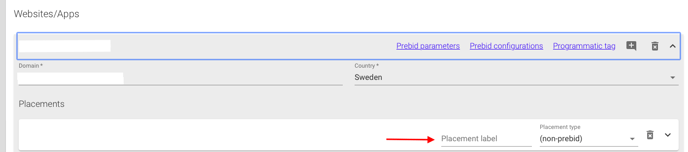
If you go to your placements (in Publisher accounts → edit a publisher → choose and expand a website), you will see the placement label as an empty field next to the placement’s name:
When you start typing a label, a list will automatically populate. This list can then be used from the drop-down menu on the next placement, so you do not need to re-enter the same value multiple times.
The label list will always consist of the labels actively used in the system. To remove a label entry, simply ensure it is not used by any of your placements.
## What Can You Use It For?
A label can be anything, as it is an open label that your organisation can use to group placements in a way that is important to you. Here are a few examples to get you started:
* **Media type:** Display, Native, Video, App
* **Above or below the fold**
* **Front page vs articles** (if you use different placements for this)
* **Content groupings across websites:** News, Cars, Sports, Fashion
Please note that only one placement label can be attached to each placement, so it is worth considering which approach brings your organisation the most value.
## How to Report on It
Once you have entered the first placement label, a list will be generated, and this will activate Placement labels in the API reporting dimensions. Simply select the dimension and run your report, or create your dashboard using it.
If you cannot find Placement labels as a dimension, please ensure that you have added at least one placement label to a placement.
---
# Agent Instructions
This documentation is published with GitBook. GitBook is the documentation platform designed so that both humans and AI agents can read, navigate, and reason over technical content effectively. Learn more at gitbook.com.
## Querying This Documentation
If you need additional information that is not directly available in this page, you can query the documentation dynamically by asking a question.
Perform an HTTP GET request on the current page URL with the `ask` query parameter, and the optional `goal` query parameter:
```
GET https://docs.relevant-digital.com/ad-revenue-insights/mapping/adding-your-own-placement-labels.md?ask=&goal=
```
`ask` is the immediate question: it should be specific, self-contained, and written in natural language.
`goal` is optional and describes the broader end goal you are ultimately trying to accomplish on behalf of the user. GitBook uses it to tailor the answer towards what is most useful for that goal.
The response will contain a direct answer to the question and relevant excerpts and sources from the documentation.
Use this mechanism when the answer is not explicitly present in the current page, you need clarification or additional context, or you want to retrieve related documentation sections.