> For the complete documentation index, see [llms.txt](https://docs.relevant-digital.com/llms.txt). Markdown versions of documentation pages are available by appending `.md` to page URLs; this page is available as [Markdown](https://docs.relevant-digital.com/technical/integration/formats-and-channels/instream-video-with-hbm-and-gam.md).
# Instream video with HBM and GAM
Configure instream video auctions with HB Manager, Google Ad Manager, and a video player.
Run instream video auctions with HB Manager and Google Ad Manager.
One Prebid auction can load banner and instream placements together. This allows pre-roll inventory to load alongside display inventory.
### Before you begin
{% hint style="warning" %}
Google Ad Manager needs separate line items for in-player video creatives. Contact Relevant Yield Support if you need them created.
{% endhint %}
### 1. Add Prebid modules
Your Prebid build needs these modules:
* **dfpAdServerVideo** — Required for this integration.
* **instreamTracking** — Optional. Enables instream revenue in Headerbid Analytics reports.
{% hint style="info" %}
The IMA SDK may not report instream tracking automatically. Use [relevantDigital.Auction.registerImpressionByAdId()](/technical/integration/javascript-api/relevantdigital.auction.registerimpressionbyadid.md) when you must register impressions manually.
{% endhint %}
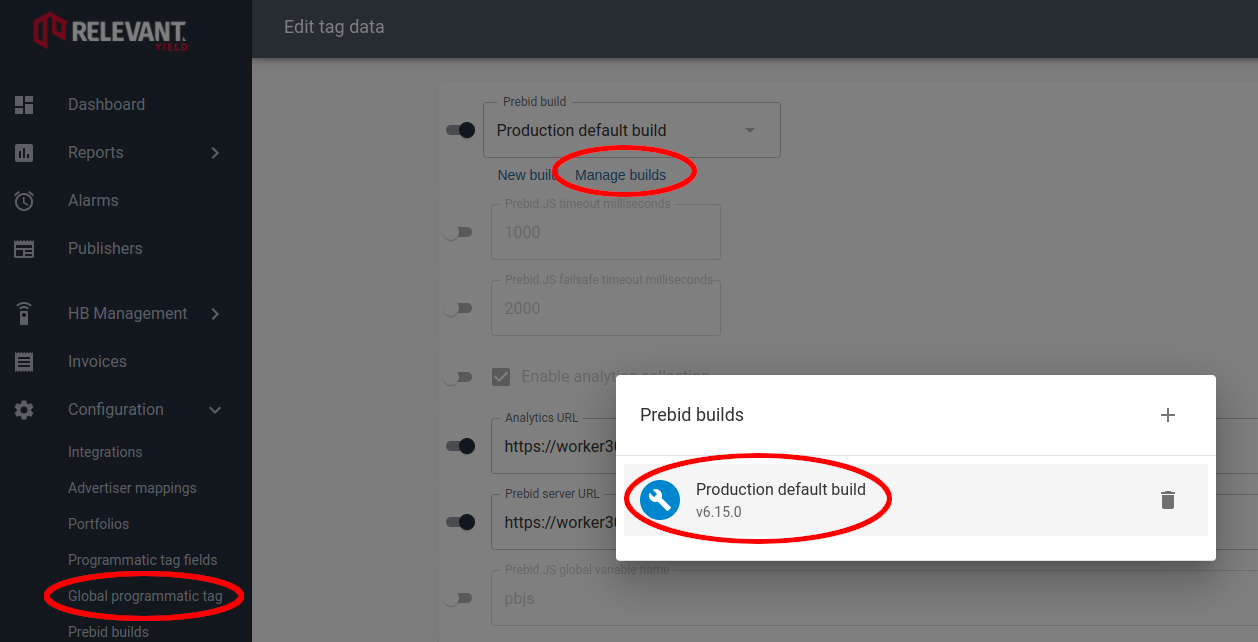 1. Select **Global programmatic tag**.
2. Select **Manage builds**.
3. Open the Prebid build you want to update.
1. Select **Global programmatic tag**.
2. Select **Manage builds**.
3. Open the Prebid build you want to update.
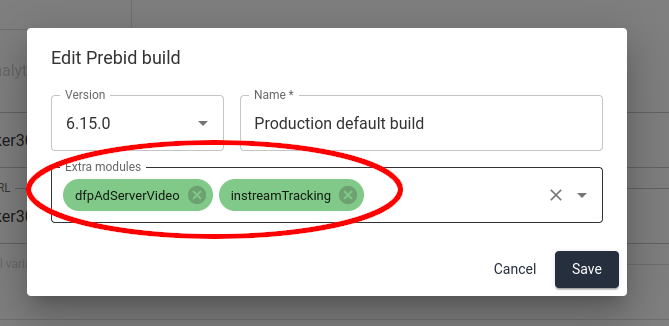 4. Add **dfpAdServerVideo** and, optionally, **instreamTracking** under **Extra modules**.
5. Click **Save**. The build completes in a few minutes.
### 2. Create an instream placement type
Create a placement type with **Instream video** as its type.
4. Add **dfpAdServerVideo** and, optionally, **instreamTracking** under **Extra modules**.
5. Click **Save**. The build completes in a few minutes.
### 2. Create an instream placement type
Create a placement type with **Instream video** as its type.
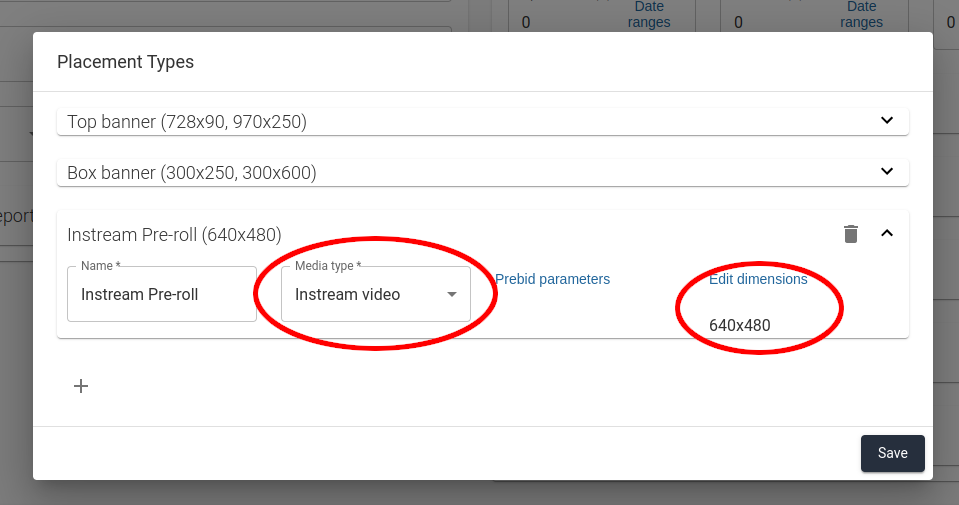 Add a dimension to set the default `playerSize`.
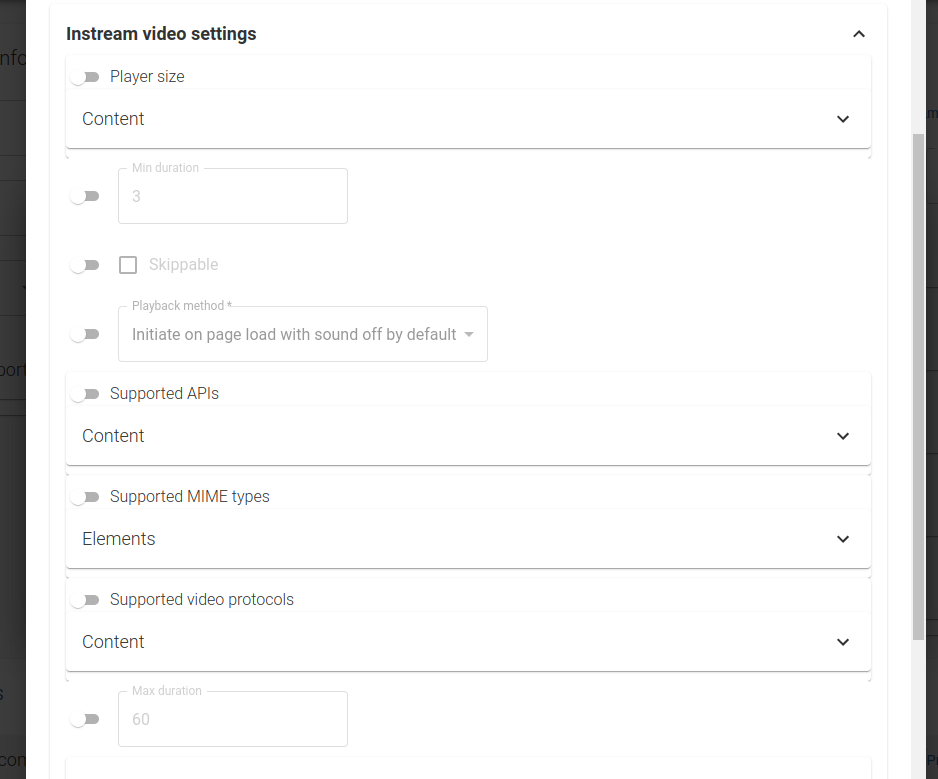
Override it through **Instream video settings** in **Prebid parameters** when needed.
Add a dimension to set the default `playerSize`.
Override it through **Instream video settings** in **Prebid parameters** when needed.
 {% hint style="info" %}
Instream settings describe inventory to SSPs. They do not control the video player.
{% endhint %}
### 3. Add instream placements
Add placements as usual, then select the instream placement type.
{% hint style="info" %}
Instream settings describe inventory to SSPs. They do not control the video player.
{% endhint %}
### 3. Add instream placements
Add placements as usual, then select the instream placement type.
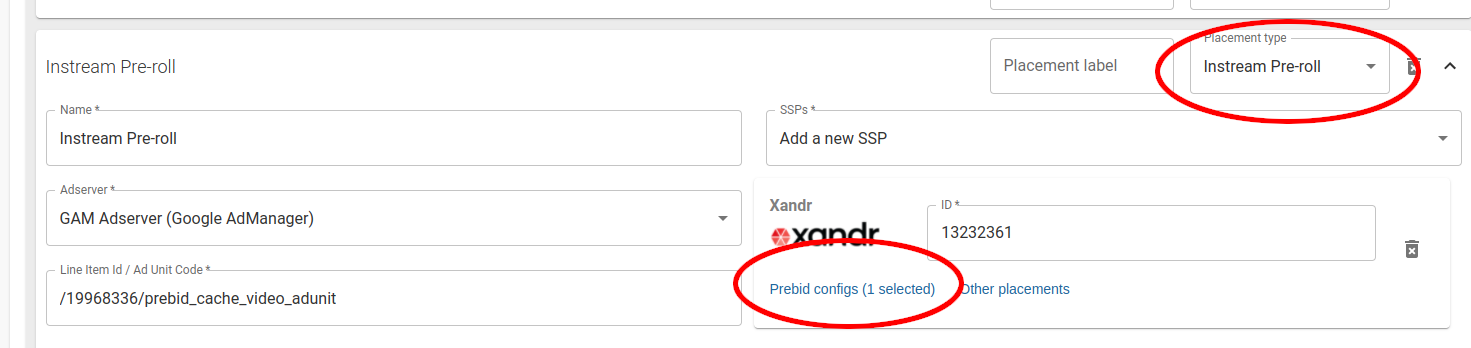 Add the placement to the site's normal Prebid configuration.
### 4. Implement the player integration
This example uses the **Brid.TV** player. The same workflow applies to other players.
1. Create video slots with [relevantDigital.defineVideoSlots()](/technical/integration/javascript-api/relevantdigital.definevideoslots.md). Create slots once per page. You can reuse a GAM ad-unit path for multiple pre-roll videos.
2. Load ads with [relevantDigital.loadPrebid()](/technical/integration/javascript-api/relevantdigital.loadprebid.md).
3. Use [relevantDigital.loadVideoUrls()](/technical/integration/javascript-api/relevantdigital.loadvideourls.md) to receive VAST URLs for the player.
#### Brid.TV example
{% code title="instream-video.html" expandable="true" collapsedlinecount="12" %}
```html
Instream Video
```
{% endcode %}
---
# Agent Instructions
This documentation is published with GitBook. GitBook is the documentation platform designed so that both humans and AI agents can read, navigate, and reason over technical content effectively. Learn more at gitbook.com.
## Querying This Documentation
If you need additional information that is not directly available in this page, you can query the documentation dynamically by asking a question.
Perform an HTTP GET request on the current page URL with the `ask` query parameter, and the optional `goal` query parameter:
```
GET https://docs.relevant-digital.com/technical/integration/formats-and-channels/instream-video-with-hbm-and-gam.md?ask=&goal=
```
`ask` is the immediate question: it should be specific, self-contained, and written in natural language.
`goal` is optional and describes the broader end goal you are ultimately trying to accomplish on behalf of the user. GitBook uses it to tailor the answer towards what is most useful for that goal.
The response will contain a direct answer to the question and relevant excerpts and sources from the documentation.
Use this mechanism when the answer is not explicitly present in the current page, you need clarification or additional context, or you want to retrieve related documentation sections.
Add the placement to the site's normal Prebid configuration.
### 4. Implement the player integration
This example uses the **Brid.TV** player. The same workflow applies to other players.
1. Create video slots with [relevantDigital.defineVideoSlots()](/technical/integration/javascript-api/relevantdigital.definevideoslots.md). Create slots once per page. You can reuse a GAM ad-unit path for multiple pre-roll videos.
2. Load ads with [relevantDigital.loadPrebid()](/technical/integration/javascript-api/relevantdigital.loadprebid.md).
3. Use [relevantDigital.loadVideoUrls()](/technical/integration/javascript-api/relevantdigital.loadvideourls.md) to receive VAST URLs for the player.
#### Brid.TV example
{% code title="instream-video.html" expandable="true" collapsedlinecount="12" %}
```html
Instream Video
```
{% endcode %}
---
# Agent Instructions
This documentation is published with GitBook. GitBook is the documentation platform designed so that both humans and AI agents can read, navigate, and reason over technical content effectively. Learn more at gitbook.com.
## Querying This Documentation
If you need additional information that is not directly available in this page, you can query the documentation dynamically by asking a question.
Perform an HTTP GET request on the current page URL with the `ask` query parameter, and the optional `goal` query parameter:
```
GET https://docs.relevant-digital.com/technical/integration/formats-and-channels/instream-video-with-hbm-and-gam.md?ask=&goal=
```
`ask` is the immediate question: it should be specific, self-contained, and written in natural language.
`goal` is optional and describes the broader end goal you are ultimately trying to accomplish on behalf of the user. GitBook uses it to tailor the answer towards what is most useful for that goal.
The response will contain a direct answer to the question and relevant excerpts and sources from the documentation.
Use this mechanism when the answer is not explicitly present in the current page, you need clarification or additional context, or you want to retrieve related documentation sections.